
Hog: HDL on git#
Introduction#
Coordinating gateware development among many international collaborators is becoming a very widespread problem. Guaranteeing gateware synthesis with Place and Route reproducibility and assuring traceability of binary files is paramount.
Hog tackles these issues by exploiting advanced git features and integrating itself with HDL IDEs: Xilinx Vivado, Xilinx ISE (planAhead)[1], Intel Quartus[2], Microchip Libero[3] and Lattice Diamond[3]. The integration with these tools intends to reduce as much as possible useless overhead work for the developers.
If you want to be informed of any published Hog release, please register to our Newsletter.
Tip
Hog is completely free and it’s developed mainly as a pet project by Davide and Francesco. If you use it, please cite our paper in your articles and proceedings. Here’s the citation in Bibtex format.
Waste no time thanks to Hog#
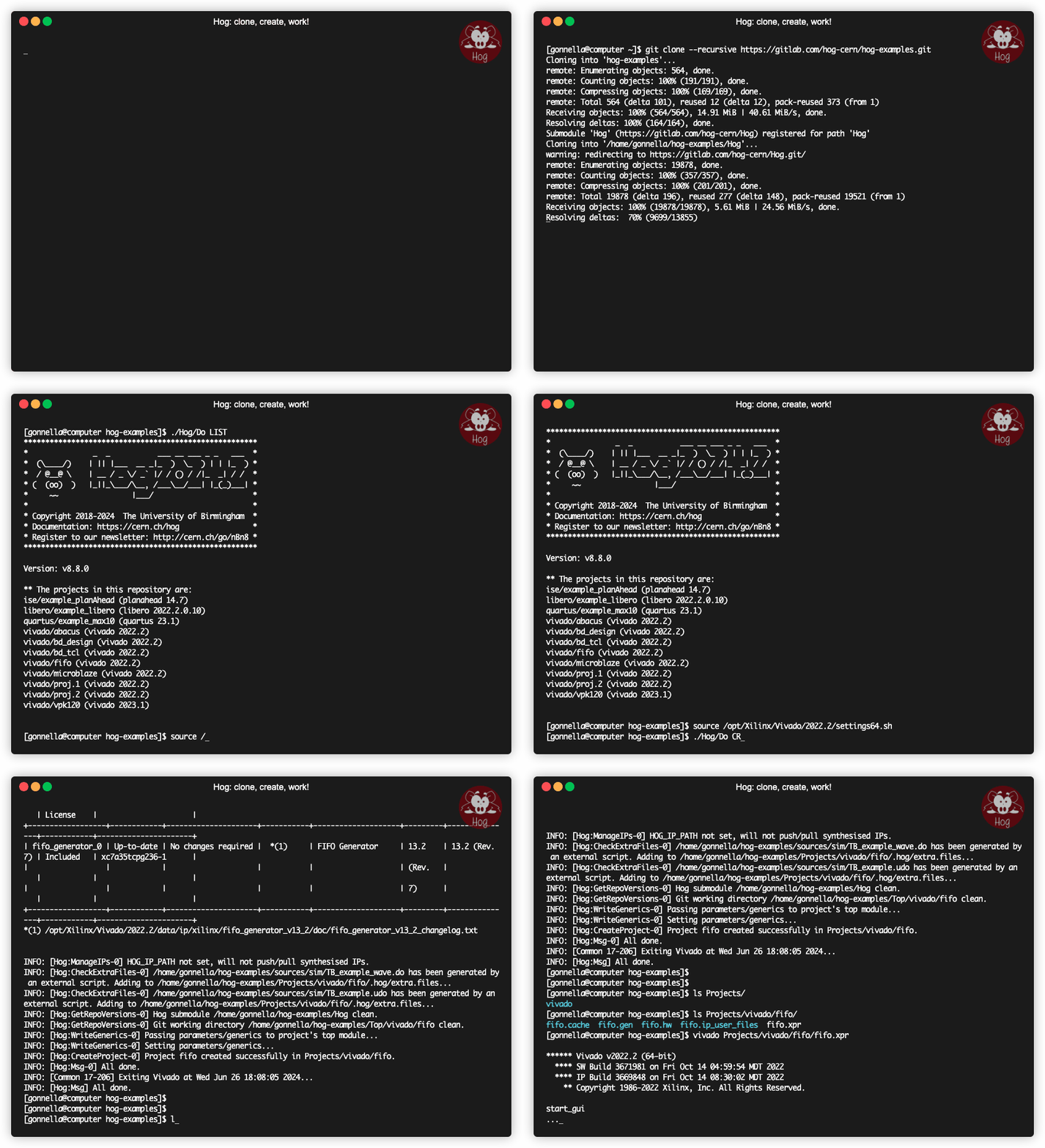
To work with a repository handled with Hog, you just need to clone it, run the Hog script and start working!
The animated gif below, shows one of our example projects, have a look:
What’s new in Hog 2025.1?#
Support to Lattice Diamond.
Pre-synthesis check for files in project and list files added to Libero and Diamond.
Support for pre-simulation scripts for all simsets or specific simset.
Added support for multiple IPbus list files.
IPBus list file extension renamed
.ipb.Added support for custom user command to be added to the
Hog/Do.Included list files can be added with a specific reference path (to include list files in submodules).
Hog passes now parameters and generics to IPs within a Vivado block design.
Option to save DCP checkpoints in Vivado synthesis and implementation, for incremental workflows.
Updated GitLab badge to new format.
Support to constraints scoping in Vivado.
Pulse Width Timing included in timing analysis in Vivado.
Option to add a project description in the
hog.conffile, and hide test projects from list.Support to VHDL2019 for compatible Vivado versions.
What is Hog?#
Hog is a set of Tcl/Shell scripts plus a suitable methodology to handle HDL designs in a git repository.
Hog is included as a git submodule in the HDL repository and allows developers to create the Vivado/PlanAhead/Quartus/Libero project(s) locally and synthesise/implement it or start working on it.
Using Hog will help you to:
easily and effectively maintain HDL code on git
ensure that code was not modified before building binary files
ensure traceability of binary files (even if produced locally)
work both with Windows and Linux
reduce code duplication by making it easy to share code among projects
waste no time to setup Continuous Integration on Gitlab or Github actions on GitHub
Thanks to Hog CI you will be able to:
automatically tag your repository for semantic versioning
automatically create releases on GitLab/GitHub (including timing and utilisation reports, changelog, and binary files)
automatically add changelog in the release note (use the
FEATURE:keyword in commit messages)Speed up IP synthesis by archiving synthesised blocks
Archive the output binary files on a remote file system
Rationale#
For synthesis and Place and Route (P&R) reproducibility, we need absolute control of:
HDL source files
Constraint files
IDE settings
For traceability, every time we produce a binary file, we must:
know exactly the source code that produced the binary files
be able to go back to that point in the repository
To do this, Hog automatically embeds the git commit SHA into the binary file together with a more understandable numeric version M.m.p. Moreover, it automatically renames the file, including the version and inserts the hexadecimal value of the SHA so that it can be retrieved (using a text editor) in case files are renamed.
Hog aims to reduce to the minimum the time needed for an external developer to get up to speed to work on an HDL project. Hog does not rely on any external tool or library. Only git (at least 2.9.3) and on those tools you must already have to synthesise, implement (Vivado/PlanAhead/Quartus) and simulate (Modelsim/Questasim/Riviera) the design.
Tip
To start working on any project contained in a Gitlab repository handled with Hog, you just need to:
git clone --recursive <HDL repository>
cd <HDL repository>
./Hog/Do CREATE <project>
The project will appear in ./Projects/<project> and you can open it with your Vivado (ISE/Quartus) GUI.
If you don’t know the project name, just run ./Hog/Do LIST and a list will be displayed.
What does Hog do?#
The heart of hog is the Do script. For example you can type:
./Hog/Do CREATE <my_project>
to create locally the Vivado/PlanAhead/Quartus/Libero project locally into the Projects directory. When creating the project, Hog integrates a set of Tcl scripts (contained in Hog/Tcl/integrated) into the IDE software.
If you don’t want to use the graphical interface of the IDE, run:
./Hog/Do WORKFLOW <my_project>
and Hog will run the complete workflow of the desired HDL project, creating the binary files in the bin directory.
To simulate in batch mode, run:
./Hog/Do SIMULATE <my_project>
runs the simulation workflow. Other scripts are stored inside the
Hog/Tcl and Hog/Other directories, have a look if you’re curious!
Tip
Directives for the Hog/Do script can be shortened.
For example ./Hog/Do L will list the projects and
./Hog/Do C <project> will create <project>.
To learn everything about the Hog/Do script, just type ./Hog/Do HELP.
Contacts#
Are you a git enthusiast? And a Tcl fan? Join us and read the Developing for Hog section.
To report a problem or suggest a feature, use the git issues in the Hog git repository. Please check in existing and solved issues before opening a new one.
For questions related to Hog, please get in touch with Hog support.
For anything related to this site, please get in touch with Davide Cieri
Keep up to date with Hog’s Newsletter.