
Usage (Hog/Do Script)#
Warning
Outdated Documentation! This documentation version is out of date. Please check the latest version 2026.1.
The Hog/Do script is a versatile tool designed to assist in managing hardware design projects and workflows. This chapter provides an overview of the available directives and options, and their usage.
You are not obliged to use the Hog/Do script, except that for creating the project. Once this is create you can open the project with the standard IDE tools, and work in your preferred environment (e.g. with a graphical interface).
Usage#
To use Hog/Do, specify a directive along with any required arguments and options:
./Hog/Do <directive> [arguments] [options]
<directive>: The action to perform (e.g., CREATE, SYNTH, IMPLEMENTATION, SIMULATION, HELP, etc.).[arguments]: Required arguments for the directive, usually the project name (e.g.,<project_name>).[options]: Optional flags or parameters to modify the command’s behavior.
You can display help for any directive by running:
./Hog/Do <directive> HELP
This will show detailed usage and available options for the specified directive.
Common Directives#
Note: All directives are case-insensitive. For example,
CREATE,create, orCrEaTeare all valid and equivalent.
Directive |
Alias |
Description |
|---|---|---|
LIST |
L |
List projects in the repository |
HELP |
H |
Show help message |
CREATE |
C |
Create or replace a project |
IMPLEMENTATION |
I |
Run implementation (project must be synthesized) |
SYNTH |
Run synthesis only |
|
SIMULATION |
S |
Run simulation (creates project if needed) |
WORKFLOW |
W |
Run full workflow (synth + impl + bitstream) |
CREATEWORKFLOW |
CW |
Create project and run full workflow |
CHECKSYNTAX |
CS |
Check HDL syntax |
XML |
X |
Manage IPbus XMLs |
VIEW |
V |
Print Hog list file contents |
CHECKYML |
YML |
Check .gitlab-ci.yml ref matches Hog submodule |
BUTTONS |
B |
Add Hog buttons to Vivado GUI |
CHECKLIST |
CL |
Check list/config files on disk vs. project |
COMPSIMLIB |
Compile simulation library |
|
SIGASI |
SIG |
Create .csv for Sigasi |
Options#
Option |
Description |
|---|---|
-no_bitstream |
Do not produce bitstream |
-recreate |
Re-create project if it exists |
-no_reset |
Do not reset runs before launching |
-check_syntax |
Check HDL syntax at start |
-njobs |
Number of jobs (default: 4) |
-ext_path |
Absolute path for external libraries |
-lib |
Simulation library path |
-synth_only |
Only perform synthesis |
-impl_only |
Only perform implementation |
-simset |
Comma-separated simulation sets to run |
-all |
List all projects, including test projects |
-generate |
For XML, re-create VHDL address decode files |
-dst_dir |
Destination folder for reports, XMLs, etc. |
-verbose |
Verbose output |
Examples#
List all projects:
./Hog/Do LIST -all
Create a project:
./Hog/Do CREATE MyProject -recreate
Run full workflow:
./Hog/Do WORKFLOW MyProject
Run simulation for a specific set:
./Hog/Do SIMULATION MyProject -simset set1
Check syntax:
./Hog/Do CHECKSYNTAX MyProject
Generate IPbus XMLs:
./Hog/Do XML MyProject -generate
Directives’ descriptions#
LIST (LIST or L)#
Description: List all projects in the repository.
Usage:
./Hog/Do LIST
Options:
all— List all projects, including test projects.verbose— Enable verbose output.
HELP (HELP or H)#
Description: Display the help message or specific help for each directive.
Usage:
./Hog/Do HELP
Options: None
CREATE (CREATE or C)#
Description: Create the project, replacing it if it already exists.
Usage:
./Hog/Do CREATE <project_name>
Options:
ext_path.arg— Absolute path for external libraries.lib.arg— Simulation library path.verbose— Enable verbose output.
IMPLEMENTATION (IMPLEMENTATION or I)#
Description: Run only the implementation step. The project must already exist and be synthesized.
Usage:
./Hog/Do IMPLEMENTATION <project_name>
Options:
check_syntax— Check HDL syntax before implementation.ext_path.arg— Absolute path for external libraries.njobs.arg— Number of jobs (default: 4).no_bitstream— Do not produce the bitstream file.no_reset— Do not reset runs before launching.recreate— Re-create the project if it already exists.verbose— Enable verbose output.
SYNTH (SYNTH)#
Description: Run synthesis only. Creates the project if it does not exist.
Usage:
./Hog/Do SYNTH <project_name>
Options:
check_syntax— Check HDL syntax before synthesis.ext_path.arg— Absolute path for external libraries.njobs.arg— Number of jobs (default: 4).recreate— Re-create the project if it already exists.verbose— Enable verbose output.
SIMULATION (SIMULATION or S) - Vivado and GHDL only#
Description: Simulate the project, creating it if it does not exist (unless using GHDL).
Usage:
./Hog/Do SIMULATION <project_name> -simset <simset>
Options:
check_syntax— Check HDL syntax before simulation.ext_path.arg— Absolute path for external libraries.lib.arg— Simulation library path.recreate— Re-create the project if it already exists.simset.arg— Simulation sets to run (comma-separated).verbose— Enable verbose output.
The simulation files and properties, such as the selected simulator, possible wave files or do files are set as explained in the section Simulation list files.
WORKFLOW (WORKFLOW or W)#
Description: Run the full workflow: synthesis, implementation, and bitstream generation. Creates the project if it does not exist.
Usage:
./Hog/Do WORKFLOW <project_name>
Options:
check_syntax— Check HDL syntax at the beginning.ext_path.arg— Absolute path for external libraries.impl_only— Only perform implementation.njobs.arg— Number of jobs (default: 4).no_bitstream— Do not produce the bitstream file.recreate— Re-create the project if it already exists.synth_only— Only perform synthesis.verbose— Enable verbose output.
CREATEWORKFLOW (CREATEWORKFLOW or CW)#
Description: Create the project (even if it exists) and run the complete workflow.
Usage:
./Hog/Do CREATEWORKFLOW <project_name>
Options:
check_syntax— Check HDL syntax at the beginning.ext_path.arg— Absolute path for external libraries.njobs.arg— Number of jobs (default: 4).no_bitstream— Do not produce the bitstream file.synth_only— Only perform synthesis.verbose— Enable verbose output.
CHECKSYNTAX (CHECKSYNTAX or CS)#
Description: Check the syntax of the project (Vivado, Quartus, and Libero only).
Usage:
./Hog/Do CHECKSYNTAX <project_name>
Options:
ext_path.arg— Absolute path for external libraries.recreate— Re-create the project if it already exists.verbose— Enable verbose output.
XML (XML or X)#
Description: Copy, check, or create the IPbus XML files for the project.
Usage:
./Hog/Do XML <project_name> [options]
Options:
dst_dir.arg— Destination folder for XMLs (default:./bin).generate— Re-create VHDL address decode files.verbose— Enable verbose output.
VIEW (VIEW or V)#
Description: Print Hog list file contents in a tree-like fashion.
Usage:
./Hog/Do VIEW <project_name>
Options:
verbose— Enable verbose output.
CHECKYAML (CHECKYML or YML)#
Description:
Check that the ref to the Hog repository in .gitlab-ci.yml matches the one in the Hog submodule.
Usage:
./Hog/Do CHECKYML
Options:
verbose— Enable verbose output.
CHECKLIST (CHECKLIST or CL)#
Description: Check that list and configuration files on disk match what is in the project.
Usage:
./Hog/Do CHECKLIST <project_name>
Options:
ext_path.arg— Absolute path for external libraries.verbose— Enable verbose output.
COMPSIMLIB (COMPSIMLIB or COMPSIM)#
Description: Compile the simulation library for the chosen simulator (Vivado only).
Usage:
./Hog/Do COMPSIMLIB <simulator> [options]
Options:
dst_dir.arg— Output directory for the compiled library.verbose— Enable verbose output.
SIGASI (SIGASI or SIG)#
Description:
Create a .csv file for use in Sigasi IDE.
Usage:
./Hog/Do SIGASI <project_name>
Options:
verbose— Enable verbose output.
Custom Hog Commands#
Starting in version 2025.1, the Hog/Do script supports the ability to add custom commands. These commands are defined in the /hog-commands directory and must be .tcl files. Hog will automatically detect and add these .tcl files as commands to the list of available commands.
For example, if you have:
/hog-commands
    /my_command.tcl
with the contents:
#my_command.tcl
puts "Hello from my command!"
You will now see the following when running ./Hog/Do HELP:
usage: ./Hog/Do [OPTIONS] <directive> [project]

Directives (case insensitive):
   - BUTTONS or B: Add Hog buttons to the Vivado GUI, to check and recreate Hog list and configuration files.
   - CECHSYNTAX or CS: Check the syntax of the project. Only for Vivado, Quartus and Libero projects.
   - CHECKLIST or CL: Check that list and configuration files on disk match what is on the project.
   - CHECKYML or YML: Check that the ref to Hog repository in the .gitlab-ci.yml file, matches the one in Hog submodule.
   - COMPSIMLIB or COMPSIM: Compiles the simulation library for the chosen simulator with Vivado.
   - CREATE or C: Create the project, replace it if already existing.
   - CREATEWORKFLOW or CW: Creates the project -even if existing- and launches the complete workflow.
   - HELP or H: Display this help message or specific help for each directive
   - IMPLEMENTATION or I: Runs only the implementation, the project must already exist and be synthesised.
   - LIST or L: List the projects in the repository. To show hidden projects use the -all option
   - SIGASI or SIG: Create a .csv file to be used in Sigasi.
   - SIMULATION or S: Simulate the project, creating it if not existing, unless it is a GHDL simulation.
   - SYNTH: Run synthesis only, create the project if not existing.
   - VIEW or V: Print Hog list file contents in a tree-like fashon.
   - WORKFLOW or W: Runs the full workflow, creates the project if not existing.
   - XML or X: Copy, check or create the IPbus XMLs for the project.

Custom Commands:
   - MY_COMMAND: runs /home/dcieri/Work/Hog/hog-examples/hog-commands/my_command.tcl
And can execute the custom command with:
./Hog/Do MY_COMMAND

INFO: [Hog:Msg] Running custom script: /path/to/repo/hog-commands/my_command.tcl
Hello from my command!
INFO: [Hog:Msg] Done running custom script...
Tip
Custom commands have full access to the functions available in the Hog.tcl.
Running the workflow using Vivado/Quartus GUI#
In a Hog handled project, the HDL workflow can always be run normally from the IDE (Vivado, Quartus) GUI, Hog integrated scripts will run automatically.
To run the IP synthesis, for example, right click on each IP and click the “Generate Output Products” button.

To synthesise the project, click on “Run Synthesis” button (on the left).
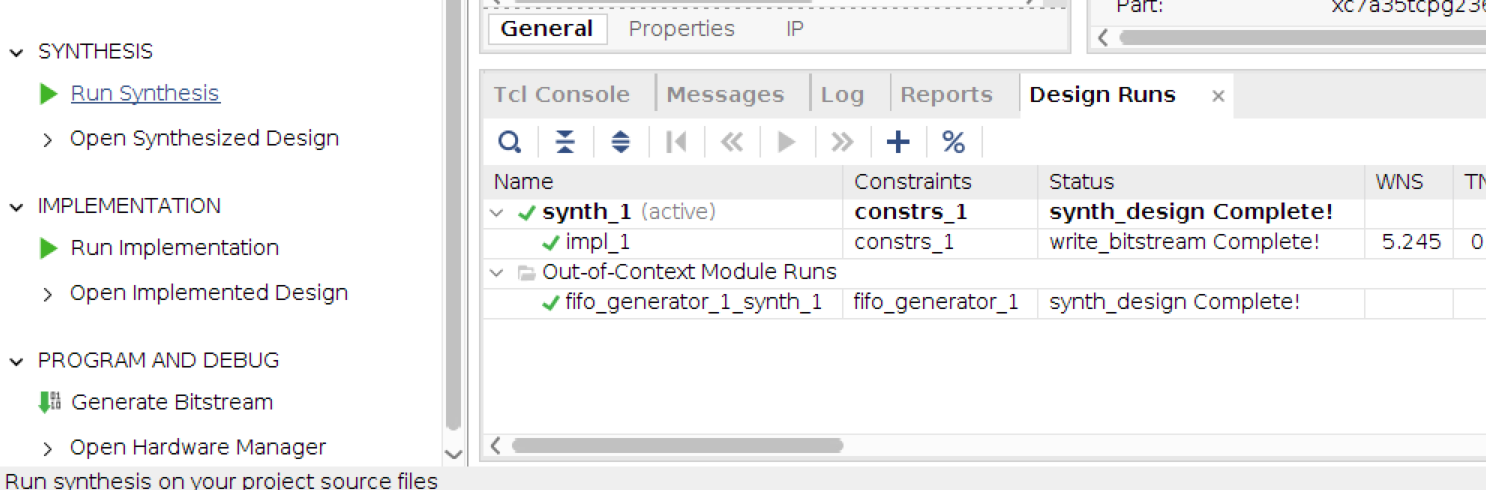
Finally, click on “Run Implementation” and “Generate Bitstream” buttons (on the left).

Note
Under Quartus always run a full compilation flow after recreating a project. Running a single module will cause errors due the Hog generics not being set to any value[1].
Collecting workflow products#
After the HDL workflow is completed, Hog will automatically copy many relevant files to the bin directory in the root of your repository. This folder should be ignored by git by means of the .gitignore file.
The files copied into the bin directory are:
The binary files (
.binand.bit) properly renamed according to thegit describe(optional) The
.ltxILA files (if ILA cores are used in the project)All the reports produced during synthesis and implementation
(Vivado only) All the
runme.logfiles produced during synthesis and implementation. They will be renamed according to the run name(optional) All the IPbus XML files used in the project listed in the
.ipblist filesA
versions.txtfile containing all the values of versions, SHAs, time, date that are passed to the top module of the project(Vivado only) In the HOG-CI (or if you launch the workflow with the script) a timing file containing the timing values of the project (WNS, TNS, WHS, THS). The file is called
timing_ok.txtif all the timing requirements were met, otherwise it is calledtiming_error.txt.
Simulating with Vivado GUI#
Using the GUI, you can run only one simulation set at the time. First of all select the simulation set you want to run, by right clicking on simulation set name in project sources window.

Then click on “Run Simulation” button (on the left). Note that using the GUI, Vivado or Quartus will use the simulation software specified in your project hog.conf file.
