
Using Hog with Libero SoC#
Warning
Outdated Documentation! This documentation version is out of date. Please check the latest version 2026.1.
From Hog2023.1, we added support to Libero SoC. To use Hog with Libero SoC, some special configurations must be set by the users.
Tcllib#
Unfortunately, Libero SoC does not ship with a full version of tcllib. Therefore, Hog has to use the system installed tcllib library.
This can be installed easily,
sudo apt install tcllib # On Ubuntu
sudo yum install tcllib # On Fedora/CentOs/RedHat
sudo zypper install tcllib # On OpenSuse
Once installed, you must tell Hog the location of the tcllib libraries, by setting the HOG_TCLLIB_PATH accordingly. E.g.
export HOG_TCLLIB_PATH=/usr/share/tcl/tcllib1.20/
This variable must be also set in the CI, following the instructions for GitLab CI/CD and for GitHub Actions.
Libero IP Cores#
Unlike Vivado or Quartus, for Libero SoC IP cores must be created at creation time, using the official Libero command. These must be written in the project post-creation.tcl script, which is automatically executed by Hog. For example, the script to create a COREFIFO IP would look like:
# Download the Core
download_core -vlnv {Actel:DirectCore:COREFIFO:3.0.101}

# Create and Configure it
create_and_configure_core -core_vlnv {Actel:DirectCore:COREFIFO:3.0.101} -component_name {COREFIFO_C0} -params {"AEVAL:4" "AE_STATIC_EN:false" "AFVAL:1020" "AF_STATIC_EN:false" "CTRL_TYPE:1" "DIE_SIZE:5" "ECC:0" "ESTOP:true" "FSTOP:true" "FWFT:false" "NUM_STAGES:2" "OVERFLOW_EN:  false" "PIPE:1" "PREFETCH:false" "RAM_OPT:0" "RDCNT_EN:false" "RDEPTH:1024" "READ_DVALID:false" "RE_POLARITY:0" "RWIDTH:20" "SYNC:1" "SYNC_RESET:0" "UNDERFLOW_EN:false" "WDEPTH:1024" "WE_POLARITY:0" "WRCNT_EN:false" "WRITE_ACK:false" "WWIDTH:20" }
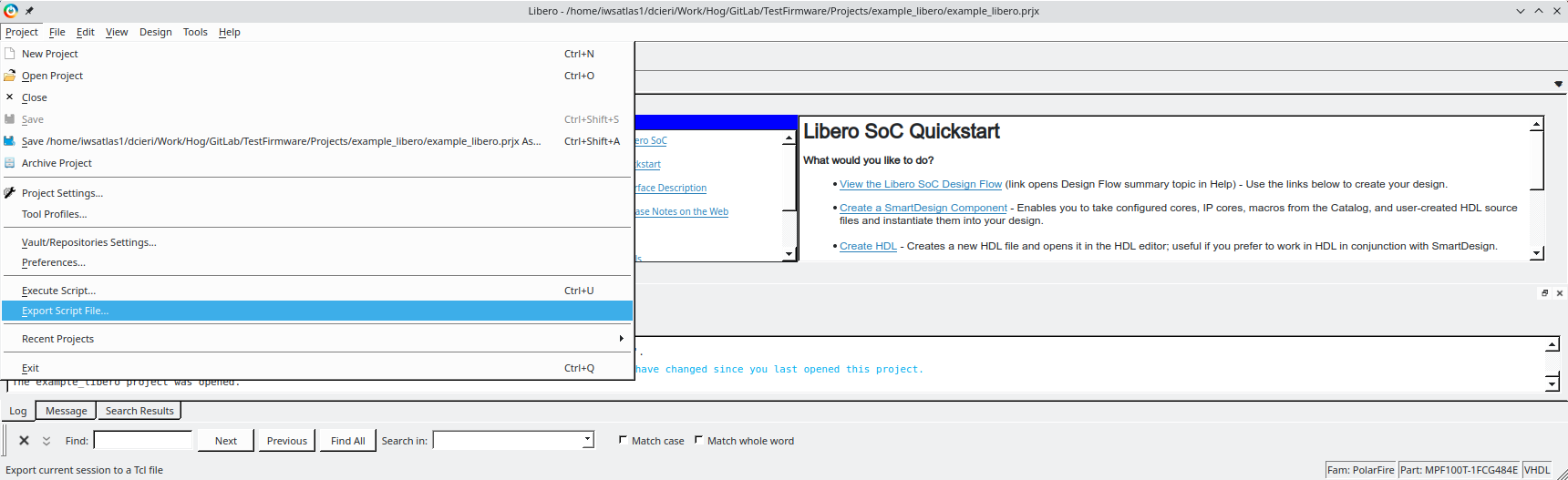
The exact command to use can be copied by Libero itself, by creating the core with the GUI and then export the tcl script from Project -> Export Tcl Script.
CI requirements#
In addition to the tcllib, to execute Hog with Libero on the Continuous Integration, you must also install the following package on your CI machine(s):
sudo apt install xvfb # On Ubuntu
sudo yum install xorg-x11-server-Xvfb # On CentOs, Fedora, RedHat
sudo zypper install xorg-x11-server-extra # On OpenSuse
Simulations#
Currently, we do not support any simulation tools for Libero SoC. Support is planned in future releases.