
Project Configuration File#
Warning
Outdated Documentation! This documentation version is out of date. Please check the latest version 2026.1.
Hog reads all project properties from a configuration file called ./Top/<my_project>/hog.conf to generate the HDL project.
The hog.conf file must contain at least a few basic variables with the information needed to build your project.
This section provides a complete guide to writing a hog.conf file for your project.
Templates for the different supported IDEs can be found under ./Hog/Templates/hog_*.conf.
Here is an example of the minimal hog.conf file needed for a Vivado project, specifying only the device:
#vivado 2020.2
[main]
PART = xc7a35tcpg236-1
Specifying the IDE Tool and Version#
The first line of your configuration file should be a comment indicating which IDE tool and version must be used to generate your project. The following tools are recognized:
vivado
planahead
quartus
libero
diamond
ghdl[1]
After the tool name, specify the version as in the following examples:
#vivado 2020.2
#vivado 2020.1_AR75210
#quartus 19.1.0
#planahead 14.7
#libero 2022.2.0.10
#diamond 3.14
The version must be in the format <a>.<b>[.<c>], i.e., two or three numbers separated by dots. There must be at least one space between the IDE name and the version. Spaces between the # and the tool name are optional, so the following syntaxes are also acceptable:
#vivado 2019.2.1
# vivado 2019.2
#  vivado   2019.2
If this line is missing, Hog will assume your project is a Vivado project but will issue a critical warning.
Why Specify the Tool Version?#
Specifying the version is important to ensure the project is run with the required tool version.
Project properties in the hog.conf file might be incompatible between different IDE versions.
More importantly, Intellectual Properties (IPs) are linked to a specific version and are not inter-version compatible.
If you use a tool older than the one specified in
hog.conf, Hog will refuse to create the project and throw an error. If you really want to create the project, you can modify the version inhog.confand retry, but success is unlikely.If you use a newer tool than specified, Hog will create the project but issue a critical warning. If you intend to upgrade your project to a newer tool version, update the version number in
hog.conf. If the project contains IPs, you will need to update those as well and possibly modify some project properties.
Project Description#
The second line of hog.conf can be used to provide a description of the project.
If the second line is a comment, it is used as a description when running ./Hog/Do LIST.
The line is stripped of all initial # and spaces and displayed after a dash in the list, as shown here:
** The projects in this repository are:

Group1/Project1 (vivado 2023.2) - The description is displayed here
Group1/Project2 (vivado 2023.2) - Another description

group2/Project1 (vivado 2020.2) - Yet another description
group2/Project2 (vivado 2023.1)
If the description contains the word “test” (in any case), the project is hidden from the list unless the -all option is specified. In this case, hidden projects will show “Test project” as a description.
Main Section: Project Variables#
The configuration file must contain a [main] section specifying at least the following variables:
PART#
The PART variable indicates the target device code for your project.
This variable is mandatory and must match the code provided by your HDL compiler.
For example, for a Xilinx Virtex-7 FPGA: xc7vx330tffg1157-2.
The exact code depends on the device’s characteristics (logic cells, package, speed grade, etc.).
FAMILY#
The FAMILY variable indicates the device family.
This variable is mandatory for Quartus only.
The value must match one provided by the HDL compiler.
For example, for an Intel MAX10 FPGA: FAMILY = "MAX 10" (note the quotation marks).
Synthesis and Implementation Sections (Xilinx Only)#
In Vivado, you can set properties at three levels: project, synthesis, and implementation.
To do this, create the corresponding sections in your hog.conf file: [main], [synth_1], [impl_1].
Example configuration for a Vivado project with several properties:
#vivado 2020.2
#This is the description of this project
[main]
PART = xc7vx550tffg1927-2

[synth_1]
STEPS.SYNTH_DESIGN.ARGS.RETIMING = true

[impl_1]
STEPS.WRITE_BITSTREAM.ARGS.BIN_FILE = 1
STEPS.OPT_DESIGN.ARGS.DIRECTIVE = Default
To find the exact property name and value, use the Vivado GUI to set the property, then copy the corresponding set_property command from the Tcl console.
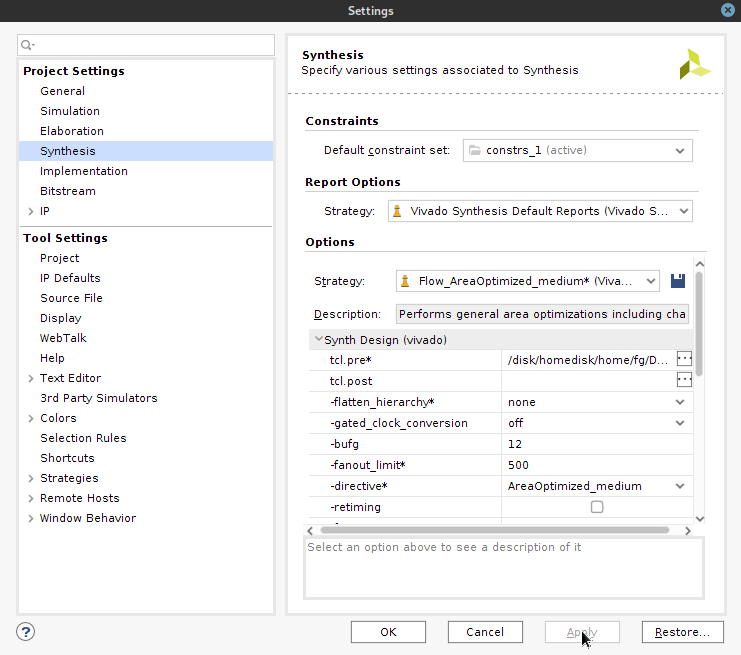
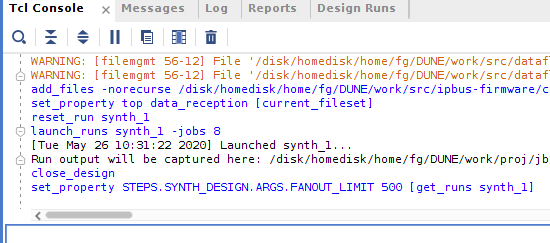
Vivado Strategies
Vivado strategies are sets of directives that change multiple parameters. Hog cannot compare the properties set by strategies against those in hog.conf. If you specify STRATEGY in hog.conf, you will get a warning and config check will be disabled.
To avoid this, set the strategy in Vivado and then regenerate the hog.conf file using the provided button. The new file will contain all the properties of the chosen strategy, without the STRATEGY parameter itself.
Parameters Section (Xilinx Only)#
Vivado projects contain volatile parameters that must be set before launching each run (synthesis and implementation).
The optional [parameters] section is used for this purpose. The most important volatile parameter is MAX_THREADS, which specifies how many cores to use for synthesis and implementation.
By default, Hog sets this value to 1 to ensure deterministic binary file production.
Example:
[parameters]
MAX_THREADS = 16
Hog Section#
The optional [hog] section is used to specify Hog directives valid for the project.
Supported properties include:
ALLOW_FAIL_ON_CONF: Do not set the version to 0 in HDL registers, even if the conf file is modified (a Critical Warning is still raised).ALLOW_FAIL_ON_LIST: Do not set the version to 0 in HDL registers, even if any list file is modified (a Critical Warning is still raised).ALLOW_FAIL_ON_GIT: Do not set the version to 0 in HDL registers, even if a file is found in the project that is not committed to the repository (a Critical Warning is still raised).EXPORT_XSA: Force or prevent the export of an XSA file for Xilinx Zynq devices (see below).PASS_GENERICS_TO_BD_IPS: Pass generics to block design IPs (see below).
Generics Section#
You can pass custom generics to the top module of your project by defining them in the [generics] section of hog.conf.
Generics (or parameters in Verilog) must be defined in your source code. Example:
[generics]
MY_GENERIC_INT=0
MY_GENERIC_STRING="a string"
MY_GENERIC_HEX=4'h7
The value of the generics should resemble the generic’s type in your top module file. E.g. for the above generics the definition should look like,
entity top_module is
  generic (
    MY_GENERIC_INT    : integer;
    MY_GENERIC_STRING : string;
    MY_GENERIC_HEX    : std_logic_vector(3 downto 0) -- To use HEX, the length of the vector should be multiple of 4
  );
  port (
    clk : in std_logic
    ... -- other ports
  );
end entity top_module;
Warning
This feature is not yet supported in Quartus.
XSA Export for Zynq Devices (Xilinx Only)#
For Xilinx Zynq devices, integration with Linux uses a Xilinx Support Archive (XSA) file.
An XSA file is a zip archive containing Vivado tool versions, part numbers, the compiled bitstream, C headers, and the Hardware Handoff File (HHF) describing the Processor-to-FPGA interface.
Hog supports automatic generation of XSA files for Zynq devices.
After bitstream generation, Hog checks the FPGA part number. If it detects a Zynq device (parts beginning with xc7z or xczu), it automatically runs the write_hw_platform command to export an XSA file.
If automatic detection fails, you can force XSA generation with the EXPORT_XSA property in hog.conf.
To disable XSA export, set the property to false.
[hog]
# Force creation of an XSA
EXPORT_XSA=true
# Prevent creation of an XSA
EXPORT_XSA=false
Passing Generics to BD IPs#
Vivado natively passes generics to block design IPs only when the block design and its IPs are generated in “Out-of-Context” mode (see Vivado documentation). In this mode, Vivado passes the top-level project’s generics to each IP during synthesis, including all Hog-related generics.
If you do not want to use out-of-context mode, there is no native way to pass generics to IPs.
To work around this, you can tell Hog to manually apply the generics to block design IPs by setting the PASS_GENERICS_TO_BD_IPS property in hog.conf.
Set this property to true to pass generics to all block design IPs, or to a regex string to match specific IP names.
[hog]
# Pass generics to all block design IPs
PASS_GENERICS_TO_BD_IPS=true

# Pass generics to BD IPs with names matching the regex:
PASS_GENERICS_TO_BD_IPS=".*ip_name.*"

# Example: pass generics to two IPs
PASS_GENERICS_TO_BD_IPS=".*ip_name1.*|.*ip_name2.*"
Hog checks each IP in the block design for Hog-related generics and applies them if found (see hog generics and custom generics for the list of supported generics).
Warning
When using this feature, the block design’s .bd file may be updated to include the last used generics. For example:
+     "parameters": {
+          "MY_GENERIC_INT": {
+            "value": "0"
+          }
+     },
Hog will always overwrite these values during project creation and at the start of each new synthesis run to ensure they match the hog.conf file.
This feature is experimental and may not work as expected in all cases. If you encounter issues, please report them to the Hog developers.