
Hog: HDL on git#
Warning
Outdated Documentation! This documentation version is out of date. Please check the latest version 2026.1.
Introduction#
Coordinating gateware development among many international collaborators is increasingly common. Ensuring gateware synthesis with Place and Route reproducibility and guaranteeing traceability of binary files is essential.
Hog addresses these challenges by leveraging advanced git features and integrating with HDL IDEs: Xilinx Vivado, Xilinx ISE (PlanAhead)[1], Intel Quartus[2], Microchip Libero[3], and Lattice Diamond[3]. Hog also supports the open-source VHDL simulator GHDL. Integration with these tools aims to minimize unnecessary overhead for developers.
If you want to be notified about new Hog releases, please subscribe to our Newsletter.
Tip
Hog is completely free and developed mainly as a pet project by Davide and Francesco. If you use it, please cite our paper in your articles and proceedings. Here is the citation in BibTeX format.
Waste no time thanks to Hog#
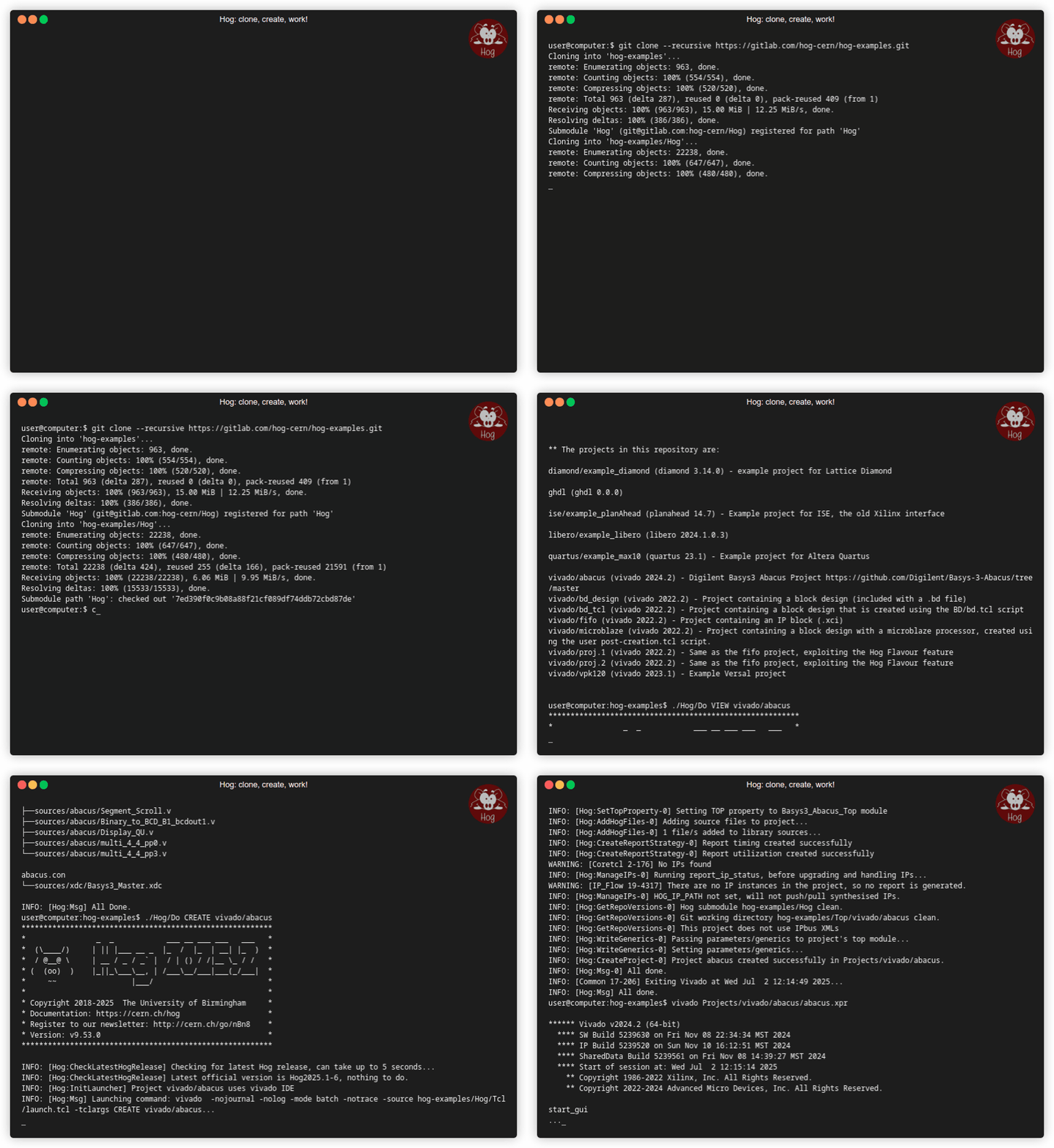
To work with a repository managed by Hog, simply clone it, run the Hog script, and start working!
The animated GIF below shows one of our example projects:
What’s new in Hog 2025.2?#
Support for GHDL simulation.
Simplified simulation configuration with new
.simlist files.Improved
HELPcommand in git style, providing individual help for each Hog directive.Enhanced logging features.
Integration of several commands into the main
Hog/Doscript.New
VIEWdirective to print the content of Hog list files in a project.Improved support for AMD Versal devices.
What is Hog?#
Hog is a set of Tcl/Shell scripts plus a robust methodology to manage HDL designs in a git repository.
Hog is included as a git submodule in the HDL repository and allows developers to create Vivado/PlanAhead/Quartus/Libero projects locally, synthesise/implement them, or start working on them.
Using Hog helps you to:
Easily and effectively maintain HDL code on git
Ensure that code is not modified before building binary files
Guarantee traceability of binary files (even if produced locally)
Work seamlessly on Windows and Linux
Reduce code duplication by making it easy to share code among projects
Save time setting up Continuous Integration on GitLab or GitHub Actions
Warning
Specific instructions for Windows users are available in the Instructions for Windows users section.
Thanks to Hog CI you will be able to:
automatically tag your repository for semantic versioning
automatically create releases on GitLab/GitHub (including timing and utilisation reports, changelog, and binary files)
automatically add changelog in the release note (use the
FEATURE:keyword in commit messages)Speed up IP synthesis by archiving synthesised blocks
Archive the output binary files on a remote file system
Rationale#
For synthesis and Place and Route (P&R) reproducibility, we need absolute control of:
HDL source files
Constraint files
IDE settings
For traceability, every time we produce a binary file, we must:
know exactly the source code that produced the binary files
be able to go back to that point in the repository
To do this, Hog automatically embeds the git commit SHA into the binary file together with a more understandable numeric version M.m.p. Moreover, it automatically renames the file, including the version and inserts the hexadecimal value of the SHA so that it can be retrieved (using a text editor) in case files are renamed.
Hog aims to reduce to the minimum the time needed for an external developer to get up to speed to work on an HDL project. Hog does not rely on any external tool or library. Only git (at least 2.9.3) and on those tools you must already have to synthesise, implement (Vivado/PlanAhead/Quartus) and simulate (Modelsim/Questasim/Riviera) the design.
Tip
To start working on any project contained in a Gitlab repository handled with Hog, you just need to:
git clone --recursive <HDL repository>
cd <HDL repository>
./Hog/Do CREATE <project>
The project will appear in ./Projects/<project> and you can open it with your Vivado (ISE/Quartus) GUI.
If you don’t know the project name, just run ./Hog/Do LIST and a list will be displayed.
What does Hog do?#
The heart of hog is the Do script. For example you can type:
./Hog/Do CREATE <my_project>
to create locally the Vivado/PlanAhead/Quartus/Libero project locally into the Projects directory. When creating the project, Hog integrates a set of Tcl scripts (contained in Hog/Tcl/integrated) into the IDE software.
If you don’t want to use the graphical interface of the IDE, run:
./Hog/Do WORKFLOW <my_project>
and Hog will run the complete workflow of the desired HDL project, creating the binary files in the bin directory.
To simulate in batch mode, run:
./Hog/Do SIMULATE <my_project>
runs the simulation workflow.
./Hog/Do VIEW <my_project>
shows a tree of all the files in the selected project, like this:
  fifo.src
  ├──sources/top/top_fifo.vhd top=top_fifo
  ├──sources/src/adder.vhd 93
  └──IP/fifo_generator_0/fifo_generator_0.xci

  other_lib.src
  └──sources/src/different_adder.vhd

  fifo.con
  └──sources/xdc/ku.xdc

  second.sim
  └──sources/sim/tb_second.vhd

  fifo.sim
  ├──sources/sim/tb_fifo.vhd
  ├──sources/sim/TB_example_wave.do
  └──sources/sim/TB_example.udo
Tip
Directives for the Hog/Do script can be shortened.
For example ./Hog/Do L will list the projects and
./Hog/Do C <project> will create <project>.
To learn everything about the Hog/Do script, just type ./Hog/Do HELP.
Contacts#
Are you a git enthusiast? And a Tcl fan? Join us and read the Developing for Hog section.
To report a problem or suggest a feature, use the git issues in the Hog git repository. Please check in existing and solved issues before opening a new one.
For questions related to Hog, please get in touch with Hog support.
For anything related to this site, please get in touch with Davide Cieri
Keep up to date with Hog’s Newsletter.