


Coloured Output Logs#
Warning
The Coloured Output Log feature is currently in an EXPERIMENTAL status! Use it carefully!
From Hog2024.1 a new system for more human readable Hog/Do script output logs is implemented.
The goal is to help developers to read and store the output logs and search for relevant information in the output of the different programs summoned from the Hog/Do
Coloured output#
The Coloured output produces a more Human readable output of the scripts adding a colored pre indication of the type of message. It also adds a table at the end of the script with counters of the types of messages had been produced to help to summarize the execution of the Hog script.
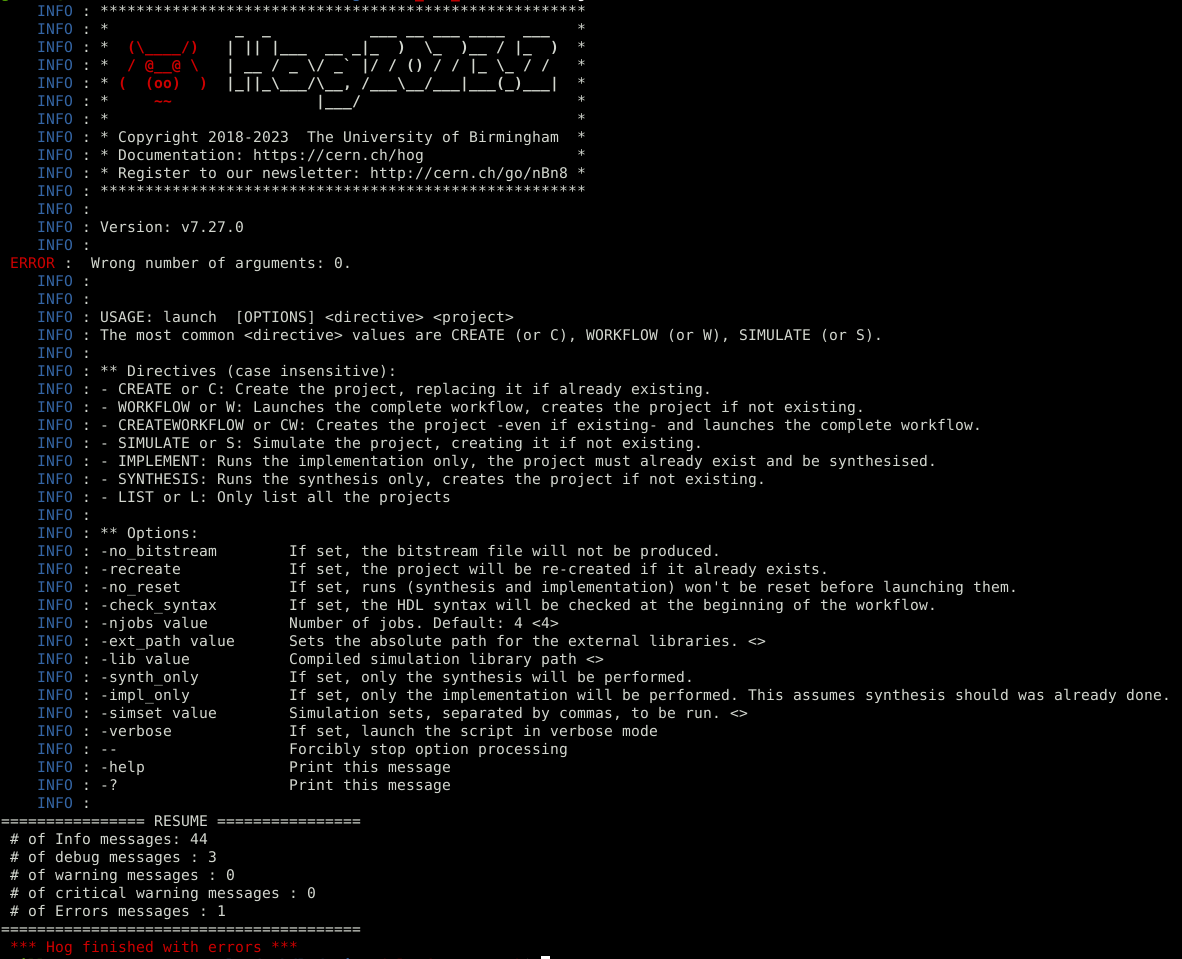
Note
Having 1 or more errors in the counter will make terminate the script with a system error, this way some errors in the summoned programs (p.e. Questa) that originally don’t trigger exit with error will mark as an error at the end of the script.
Warning
The current version of the coloured logs only works well with black or dark background console.
In order to use the coloured output and reformatted output for Hog the developer must add the variable HOG_COLORED with the value ENABLED to the environment variables.
HOG_COLORED=ENABLED
Save Logs#
The save logs option stores the output of the Hog/Do script into log files in the root of the project.
For this matter 2 files are generated, one for the overall output of the script and other for the high attention messages.
hog_info.log: In this file is stored all the raw output of the script without colours.
hog_warning_errors.log: In this file will be stored only the messages with severity
ERROR,WARNINGandCRITICAL WARNING
In order to save the logs in files the developer must add the variable HOG_LOGGER with the value ENABLED to the environment variables.
HOG_LOGGER=ENABLED
Warning
The files will be overwritten every time that the Hog/Do script runs.
Hog Environmental configuration files#
Project HogEnv.conf#
This file configures the behavior of Hog and its Logger Project wide. Because this file is in the project folder will affect also to the CI jobs.
Options#
fail when error : (not yet implemented) it will trigger the kill of the process or job
enabled : enables the option
delay : set a number of delay messages before killing
exclude : excludes errors with the strings in the array
Overloads : allows to overload the verbose level of message output by the script to another verbose level defined by the user
(verbose level original)2(new verbose level) : all the error messages containing one of the strings in the array will be output as critical warnings
Example:
e2c will convert the error message in a critical message
i2w will convert the info message in a warning message
c2e will convert the critical message in a error message
# ############################
# Hog Configuration File
# ############################

# Force Hog to stop processing when an error is detected


[fail when error] #not implemetned yet
enabled= 0
delay= 30
exclude=[ "Wrong number of arguments"]

# overload the type of message to show
# EX:
#   e2c: error will be shown as critical
[overloads]
e2c=["(vsim-86)" ,
  "(vsim-3421)",
  "Fatal error in Subprogram get_b_chamber_type",
  "Can't parse message of type "ReportMetaData" because it is missing required fields: report_type",
  ]
i2w=[
  "[HDL 9-3088]"
]
c2e=[
  "[Hog:ReadListFile-0]",
  "[HDL 9-1206]",
  "[HDL 9-3136]",
  "[HDL 9-3242]",
  "[HDL 9-3500]",
  "[HDL 9-1314]",
  "[HDL 9-3429]",
  "[HDL 9-5341]",
  "[HDL 9-4622]",
  "[HDL 9-5342]",
  "[HDL 9-3609]",
  "[HDL 9-845]",
  "[HDL 9-3609]",
  "[HDL 9-1797]",
  "[HDL 9-3611]",
  "[HDL 9-3134]",
  "[Synth 8-6859]",
  "[HDL 9-3082]"
  ]
w2i=[
  " Case choice must be a locally static expression [/home/guille/ATLAS/l0mdt-hdl-design/HAL/ctrl/src/SM_C2C_INTF/misc/I2C_reg_master.vhd:"
]
# i2e=["Copyright 1986-2022 Xilinx, Inc. All Rights Reserved."]
Home HogEnv.conf#
This file configures the appearance of the Logger.
This folder will be in the home folder of the user and will only affect Hog Locally
terminal : Configurations about the appearence of the Hog output
logger : Enables the output of log files as described previously [0: disabled ; 1: Enabled]
colored : Enables the color level of the Hog output [0: monocrome; 1: basic color scheme; 2: full colored logs]
verbose : Allows to change what is verbose by the Hog Logger
pidshow : Allows to change what is verbose by the Hog Logger [0: disabled ; 1: Enabled]
lineCounter : Shows a line counter in the left of the logger [0: disabled ; 1: Enabled]
msgtypeCounter : Shows a message type line counter in the left of the logger [0: disabled ; 1: Enabled]
# ############################
# Hog User Configuration File
# ############################

[terminal]
# colorscheme=clear
logger= 1
colored=2

# [verbose]
# # level= 5
# pidshow=1
# lineCounter=1
# msgtypeCounter=1